Download OTB Reviewer
Current version: 1.4.0
Windows 10 or later • No prerequisites required • Self-contained
These links download a small installer that will automatically fetch and install the application.
The app will automatically check for updates after installation.
What It Does
Fast Notation Entry
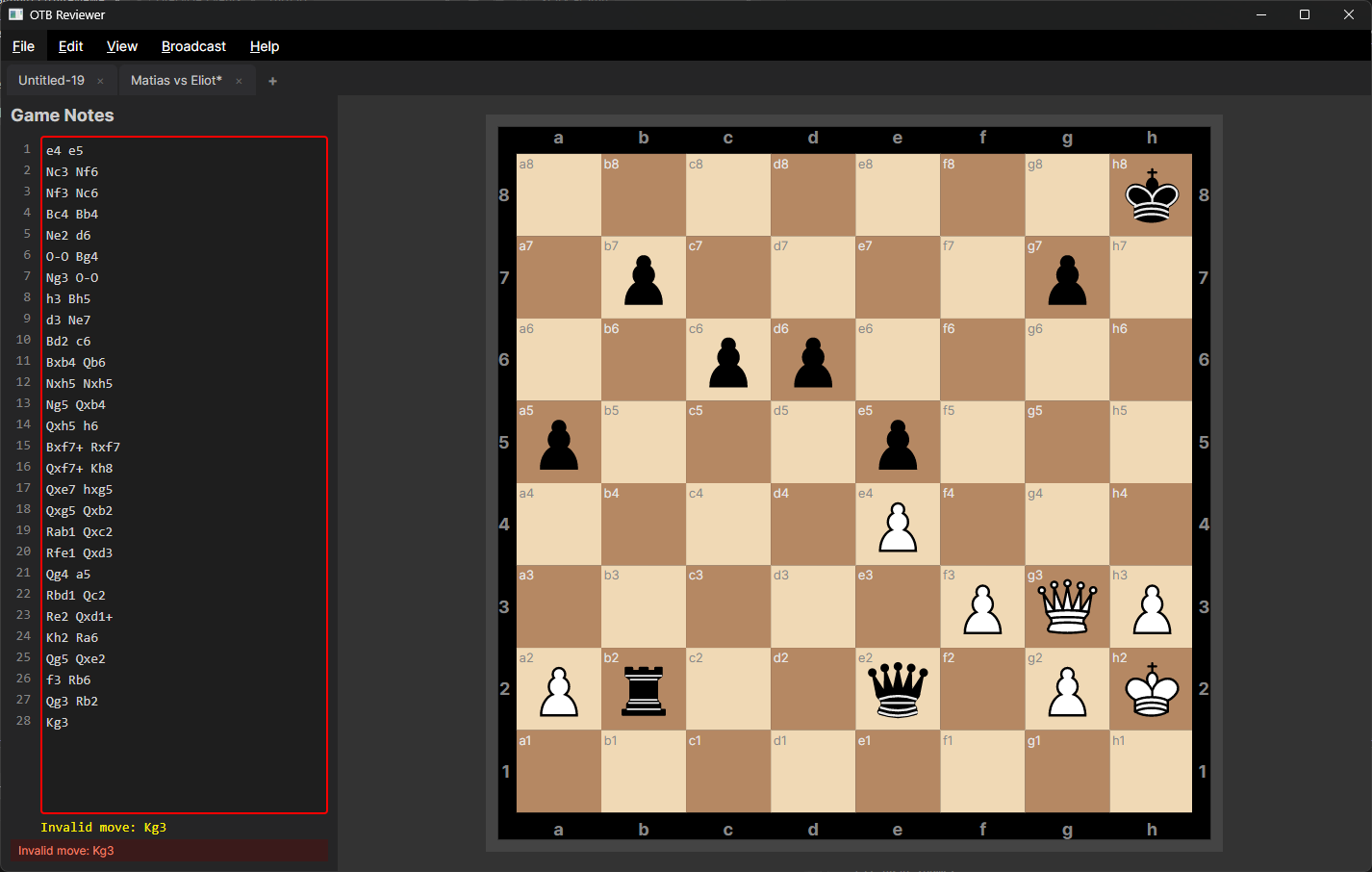
Type chess moves in standard algebraic notation with a clean, numbered editor. Each line is one full move.
Instant Error Detection
Every move is validated against legal chess rules as you type. Invalid or ambiguous moves are flagged immediately — not after the game is complete.
Live Board Display
A full chess board updates in real time as you enter moves, giving you visual confirmation the notation matches what was played.
PGN Import & Export
Open existing PGN files or save your transcribed games. Export directly to Lichess with one click.
Tabbed Interface
Work on multiple games simultaneously. Tabs auto-name based on player names or opening moves.
Live Broadcast
Broadcast games in real time via SFTP for live tournament coverage. Compatible with Lichess Broadcasts for instant online viewing.
Who It's For
- Tournament directors transcribing player scoresheets after a round
- Coaches reviewing student games from handwritten notation
- Players digitizing their own OTB games
- Anyone who needs a fast, reliable way to convert handwritten chess notation into validated PGN files
Patch Notes — v1.4.0
New Features & Improvements
- Advanced OCR Fallbacks — Re-architected OCR engine with multiple-choice fallbacks, Levenshtein fuzzy string matching, and prompt caching.
- Chain-of-Thought AI — Models now analyze strokes step-by-step prior to transcription, significantly reducing hallucinations.
- Claude 5 Support — Added dynamic model fetching and out-of-the-box support for the new 2026 Claude Sonnet models.
- UI Enhancements — Fully wired the alignment grid editor natively using a Viewbox to completely fix mouse drift issues when defining crop boxes.
Bug Fixes
- Gera.Chess Engine Fixes — Handled edge cases where the chess engine silently corrupted the board on hallucinated capture moves (e.g., `Bxh3` on empty square).
- Transcription Tuning — Tuned vision prompts to distinguish visually ambiguous characters (`B` vs `Q`, `b` vs `d`).
Patch Notes — v1.3.6
New Features & Improvements
- OCR Scoresheet Reading — Read moves directly from a scoresheet image via the File menu (Read Moves from Image...).
- Move Navigation Buttons — Added navigation buttons (<<, <, >, >>) above the board to easily step forward and backward through the game.
- Cursor Tracking — The editor now tracks selection start and end to improve interaction and synchronization.
Patch Notes — v1.3.5
New Features & Improvements
- Manual Update Checking — Added a "Check for Updates" option to the Help menu.
- App Icon Enhancements — Regenerated the "Nf3" app icon to perfectly scale without borders, including displaying correctly on the taskbar.
- Optimized Auto-Updater — The updater now unzips only the necessary executable (~10MB) instead of the entire archive, vastly improving startup speed before restarts.
Bug Fixes
- Fixed a bug where a negative build version would cause a silent crash preventing the auto-updater from operating.
- Fixed auto-updater manifest parsing for older clients resulting from case-sensitive JSON processing.
Patch Notes — v1.3.0
New Features
- Live Broadcast — Broadcast games via SFTP, compatible with Lichess Broadcasts. Per-tab control, upload throttling, auto-validation.
- Logging — Rolling log files via log4net (10 MB max, 3 backups). View Log option under Help menu.
- Auto-Update — The app checks for updates on startup and offers Ignore, Update on Close, or Restart & Update.
- Error Label — Invalid/ambiguous move messages pinned below the editor, always visible.
Improvements
- Settings moved to Edit menu
- Closing the last tab opens a fresh untitled tab
- API token saves reliably
Bug Fixes
- Fixed scrollbar overflow in notation editor
- Fixed settings dialogs overwriting each other's values